2016年11月17日 星期四

Unit test 使用 JNDI

[Need Jar]
ojdbc6.jar
tomcat-juli.jar


[Sample Code]
package com.tv.util.db;

import java.sql.Connection;
import java.sql.ResultSet;
import java.sql.SQLException;
import java.sql.Statement;

import javax.naming.Context;
import javax.naming.InitialContext;
import javax.naming.NamingException;
import javax.sql.DataSource;

import org.junit.Before;
import org.junit.Test;

import oracle.jdbc.pool.OracleConnectionPoolDataSource;

public class JndiConnectionTest {

@Before
public void init() {
try {
// Create initial context
System.setProperty(Context.INITIAL_CONTEXT_FACTORY, "org.apache.naming.java.javaURLContextFactory");
System.setProperty(Context.URL_PKG_PREFIXES, "org.apache.naming");
InitialContext ic = new InitialContext();
ic.createSubcontext("java:");
ic.createSubcontext("java:/comp");
ic.createSubcontext("java:/comp/env");
ic.createSubcontext("java:/comp/env/jdbc");

// Construct DataSource
OracleConnectionPoolDataSource ds = new OracleConnectionPoolDataSource();
ds.setURL("jdbc:oracle:thin:@ip:port:sid");
ds.setUser("test");
ds.setPassword("test");

ic.bind("java:/comp/env/jdbc/sid", ds);
} catch (NamingException ex) {
ex.printStackTrace();
} catch (SQLException e) {
e.printStackTrace();
}
}

@Test
public void simpleConnectionTest() {
Connection con = null;
try {
Context initContext = new InitialContext();
Context webContext = (Context) initContext.lookup("java:/comp/env");

DataSource ds = (DataSource) webContext.lookup("jdbc/sid");
con = ds.getConnection();
Statement st = con.createStatement();
ResultSet rs = st.executeQuery("select * from userprof where userid = '2000131'");
int cnt = 1;
while (rs.next()) {
System.out.println((cnt++) + ". BAN:" + rs.getString("BAN") + " User:" + rs.getString("USERID") + " BRIEFNAME:" + rs.getString("BRIEFNAME"));
}
rs.close();
st.close();
} catch (NamingException e) {
e.printStackTrace();
} catch (SQLException e) {
e.printStackTrace();
} finally {
if (con != null) {
try {
con.close();
} catch (Exception ignore) {
ignore.printStackTrace();
}
}
}
}
}

2016年2月25日 星期四

javascript replace

javascript replace:

var tel = "#0-9#80-123456#";

var telTemp = tel.replace(/\#|\-/g,"");  //replace 掉 # , -

alert(tel + " , " + telTemp); //#0-9#80-123456# , 0980123456

2016年2月15日 星期一

itext image to pdf 大小設定


Document document = new Document();
String filePath = "D:/J089/J089-workspace/SimpleTest/pdf/temp/tmp.pdf";

PdfWriter.getInstance(document, new FileOutputStream(filePath));

document.open();
Image image1 = Image.getInstance(imgPath);


方法一:

float pageWidth = document.getPageSize().getWidth();
float leftMargin = document.leftMargin();
float rightMargin = document.rightMargin();
float imageWidth = image1.getWidth();

float scaler = (( pageWidth - leftMargin - rightMargin ) / imageWidth ) * 100;

image1.scalePercent(scaler);


方法二:

float documentWidth = document.getPageSize().getWidth() - document.leftMargin() - document.rightMargin();
float documentHeight = document.getPageSize().getHeight() - document.topMargin() - document.bottomMargin();
image1.scaleToFit(documentWidth, documentHeight);


document.add(image1);
document.close();

2015年12月10日 星期四

jquery 升級須注意寫法


* 升級須注意寫法:
(1) [@name=fruit] & [name=fruit]

1.2.6
$("input[@name=fruit][@value=banana]").attr('checked',true);

1.11.3
$("input[name=fruit][value=banana]").attr('checked',true);

(2) attr & prop

1.2.6
if($("input[@name=fruit][@value=banana]").attr('checked')) {
alert("已選取");
} else {
alert("尚未選取");
}

1.11.3
if($("input[name=fruit][value=banana]").prop('checked')) {
alert("已選取");
} else {
alert("尚未選取");
}

(3) 利用 $('input[@type=checkbox][@checked]').length 來判斷是否有checkbox被勾選

1.2.6
if($('input[@type=checkbox][@checked]').length != 0 ) {
alert("已勾選");
} else {
alert("至少勾選一種類別");
}

1.11.3
無法使用1.2.6的 [@checked] 方式判斷,可以改成 :checked 判斷
if($('input[type=checkbox]:checked').length != 0 ) {
alert("已勾選");
} else {
alert("至少勾選一種類別");
}


(4) .trigger()事件時的Checkbox/Radio checked狀態,
當使用.trigger("click")或.click()觸發Checkbox及Radio時,
在事件中會看到與實際checked屬性相反的狀態,1.9版之後修正

1.2.6
$('input[@name=triggerBtn]').bind('click',function(){
$("input[@name=fruit][@value=apple]").trigger("click");
});
$("input[@name=fruit][@value=apple]").bind('click',function(){
alert(this.checked);//false
});

1.11.3
$('input[name=triggerBtn]').bind('click',function(){
$("input[name=fruit][value=apple]").trigger("click");
});
$("input[name=fruit][value=apple]").bind('click',function(){
alert(this.checked);//true
});

==================================================================

jquery-1.11.3.min.js 不能用下列寫法,會出現不支援此屬性或方法 , 但 v1.4 的確可以

$('select[name=statusFlag] > option[value=]').attr('selected',true) ;

需改成

$('select[name=statusFlag] > option[value=""]').attr('selected',true) ;


所以寫

 $('select[name=seizedOrg] > option[value=<%=seizedOrg%>] ').attr('selected',true) ;

要注意,要加""

 $('select[name=seizedOrg] > option[value="<%=seizedOrg%>"] ').attr('selected',true) ;

2015年2月1日 星期日

重構概念

重構(refactoring)
指不改變外部所見的程式行為的前提下,將程式內部的結構進行改善。

主要兩點:
1.即使執行了重構,亦不會改變外部所見的程式行為。
2.一旦執行了重構,程式內部的結構將會改善。

執行三步驟:
1.在重構前先進行測試。
2.進行重構。
3.在重構之後再度進行測試。

重構的限制:
1.程式還不能執行的情況。
2.時間緊迫的情況。

不祥的徵兆:
1.難以理解。
2.難以修改。
3.難以擴張。

例如:重複的程式碼、冗長的方法、過多的引數、變更的分散、公開方法過多...等。

不祥的徵兆6個口訣:
1.重複了。
2.太長了。
3.太多了。
4.名不符其實。
5.公開太多了。
6.不太像是物件導向。


重構的本質:
Step by Step
1.非同時進行兩個修改。
2.為了易於回復。
3.以Step為單位的確認。
4.由舊換新。


=====================================================================
<用符號常數取代Magic Number>
1.Magic Number-用符號常數取代Magic Number
例如:
在程式碼中寫下了100,這數字代表了什麼無法立即得知。
可是如果將100換成了 MAX_INPUT_LENGTH 可大幅增加程式的可讀性。

問題:
Magic Number的意義難以了解。
Magic Number寫在多個地方時難以修改。

解決:
使用符號常數來取代 Magic Number。


但有時像
for(int i = 0 ; i < buffer.length ; i++){...} (O)
就不用在刻意去改成
for(int i = 0 ; i < BUFFER_SIZE ; i++){...} (X)

2.用class來取代Type Code
TypeCode是指為了區別事務而分配的數值的意思。

範例程式:
public class RobotCommand {
 private final String _name;
 public RobotCommand(String name) {
  _name = name;
 }
}

public static final RobotCommand COMMAND_WALK = new RobotCommand("WALK");
public static final RobotCommand COMMAND_STOP = new RobotCommand("STOP");
public static final RobotCommand COMMAND_JUMP = new RobotCommand("JUMP");

public void order(RobotCommand command) {
 if(command == COMMAND_WALK) {
 } else if(command == COMMAND_STOP) {
 } else if(command == COMMAND_JUMP) {
 } else {...}
}

3.使用enum

public Robot {

 public enum Command {
  WALK,STOP,JUMP
 }

 public void order(Robot.Command command) {
  if(command == COMMAND.WALK) {
  } else if(command == COMMAND.STOP) {
  } else if(command == COMMAND.JUMP) {
  } else {...}
 }

}


=====================================================================

<控制旗標(flag)的移除>

旗標(flag):
用來記錄狀態並控制處裡流程的boolean型態的變數。

問題:
處理流程是被控制旗標所控制著,程式碼會變得更複雜。

解決:
用break、continue、return來取代控制旗標來控制流程。


2015年1月25日 星期日

DOM 概念


在瀏覽器中執行 HTML 網頁,瀏覽器會讀取 HTML 文件,將文件載入到記憶體之中,

依照 HTML 語法來剖析組成文件的標籤。在瀏覽器剖析組成文件的標籤過程中,

會將文件轉換為程式碼能夠處理的物件模型:DOM(Document Object Model),

並將這個物件模型建立在執行環境內。


DOM API 是瀏覽器在 HTML 執行環境中,提供給開發人員使用,用來控制 HTML 文件的

API。

在 DOM API 瀏覽器會將 HTML 文件轉換為樹狀結構的 DOM tree,並使用這個 DOM tree 作

為模型來提供 API 功能,而在 DOM tree 上對於 node 的各種操作都會反應到 HTML 文件上。

DOM API 裡封裝了各種操作 node 的功能,這些 node 操作將變更顯示樣式、新增移除 node ...

等等的功能封裝成物件屬性、方法,並且散落在作為 DOM 入口的document物件、以及作為

DOM 模型的 node 物件上。


2015年1月20日 星期二

Javascript冒泡事件

Javascript冒泡事件


範例程式:

$(document).ready(function(){
$("#testButton").click(function(e){
//e.preventDefault();
//e.stopPropagation();
alert("testButton");
//return false
});
});


<form id="testForm" method="post" action="aaa.jsp">
<div id="testId" onclick="alert('div1');">
<div onclick="alert('div2');">
<div onclick="alert('div3')">
<button id="testButton" >testButton</button>
</div>
</div>
</div>
</form>


如果按下testButton,結果會是

alert("testButton") -> alert("div3") -> alert("div2") -> alert("div1") -> 最後會form submit。

這就是Javascript冒泡事件,就是當一個元素的事件被觸發時(click),他的父元素也會一一被觸發,造成了事件的多層觸發。


這時候可以使用下面三種方式來達到真正的需求 preventDefault、stopPropagation、return false。

(1)使用 event.preventDefault

$("#testButton").click(function(e){
e.preventDefault();
alert("testButton");
});

結果:
alert("testButton") -> alert("div3") -> alert("div2") -> alert("div1")。

(2)使用 event.stopPropagation

$("#testButton").click(function(e){
e.stopPropagation();
alert("testButton");
});

結果:
alert("testButton") -> form submit。

(3)使用 return false

$("#testButton").click(function(e){
alert("testButton");
return false
});

結果:
只會執行alert("testButton")。


參考網址:
http://www.cnblogs.com/leeten/p/4137274.html
http://blog.winwu.today/2013/08/eventpreventdefaultreturn-false.html
http://www.cnf2e.com/javascript/return-false-preventdefault-stoppropagation.html


2015年1月19日 星期一

jquery radio select 操作


取得選中radio box的值:

$('input[name="radioName"]:checked').val();


取的下拉式選單的值:

$("#selectID").find(":selected").val();


2015年1月14日 星期三

javascript 判斷 android 或 ios 系統

上網找到了下面兩種方法:


<script language="JavaScript" type="text/javascript">

//第一種方式
var browser = {
versions: function() {
var u = navigator.userAgent;
var app = navigator.appVersion;
return {
trident: u.indexOf('Trident') > -1, //IE
presto: u.indexOf('Presto') > -1, //opera
webKit: u.indexOf('AppleWebKit') > -1, //apple、google
gecko: u.indexOf('Gecko') > -1 && u.indexOf('KHTML') == -1, //Firefox
mobile: !!u.match(/AppleWebKit.*Mobile.*/) || !!u.match(/AppleWebKit/), //是否為手機
ios: !!u.match(/\(i[^;]+;( U;)? CPU.+Mac OS X/), //ios
android: u.indexOf('Android') > -1 || u.indexOf('Linux') > -1, //android或uc瀏覽器
iPhone: u.indexOf('iPhone') > -1 || u.indexOf('Mac') > -1, //是否為iPhone或著QQHD瀏覽器
iPad: u.indexOf('iPad') > -1, //是否iPad
webApp: u.indexOf('Safari') == -1
};
}(),
language: (navigator.browserLanguage || navigator.language).toLowerCase()
}

document.writeln("語言版本: " + browser.language + " , ");
document.writeln(" 是否為手機: " + browser.versions.mobile + " , ");
document.writeln(" ios: " + browser.versions.ios + " , ");
document.writeln(" android: " + browser.versions.android + " , ");
document.writeln(" 是否為iPhone: " + browser.versions.iPhone + " , ");
document.writeln(" 是否iPad: " + browser.versions.iPad + " , ");
document.writeln(navigator.userAgent + " , ");

if (browser.versions.ios || browser.versions.iPhone || browser.versions.iPad) {
alert("ios");
}
else if (browser.versions.android) {
alert("android");
}
else{
alert("nothing");
}


//第二種方式
if (/(iPhone|iPad|iPod|iOS)/i.test(navigator.userAgent)) {
    alert("ios_2");
} else if (/(Android)/i.test(navigator.userAgent)) {
    alert("android_2");
} else {
    alert("nothing_2");
};
</script>

寫好後可以利用chrome的手機模擬測試看看,是否成功

按F12 -> 左下角圖案 -> 右上角選擇手機型號測試


2014年12月11日 星期四

C#頁簽-TabControl-跳到指定頁簽


設定事件:
name:tcl_LRX1
SelectedIndexChang:tcl_LRX1_SelectedIndexChanged


private void tcl_LRX1_SelectedIndexChanged(object sender, EventArgs e)
{
   ...
   this.tcl_LRX1.SelectedIndex = 1; //指定要跳到頁簽的index
}

2014年12月1日 星期一

angularJS 簡單sample


<html ng-app>
<head>
<meta http-equiv="Content-Type" content="text/html; charset=BIG5">
<script type="text/javascript" src="js/jquery/jquery-1.8.2.min.js"></script>
<script type="text/javascript" src="js/angularJS/angular.js"></script>
<script language="JavaScript" type="text/javascript">

function fruitControl($scope) {
$scope.fruitModel = [{id:1,fruitName:'apple',fruitPrice:5},
                    {id:2,fruitName:'banana',fruitPrice:10},
                    {id:3,fruitName:'orange',fruitPrice:8},
                    {id:4,fruitName:'peach',fruitPrice:20}];

$scope.fruitList = $scope.fruitModel[0];

$scope.discount = 1;
}

</script>

</head>
<body>

<span ng-controller="fruitControl">
水果:<select ng-model="fruitList" ng-options="fruit.fruitName for fruit in fruitModel"></select>
折扣:<input type="radio" ng-model="discount" value="0.25"/>25折
<input type="radio" ng-model="discount" value="0.5"/>5折
<input type="radio" ng-model="discount" value="0.75"/>75折
<div ng-switch on="fruitList.fruitName">
<div ng-switch-when="apple">apple is {{fruitList.fruitPrice * discount}} dollars.</div>
<div ng-switch-when="banana">banana is {{fruitList.fruitPrice * discount}} dollars.</div>
<div ng-switch-when="orange">orange is {{fruitList.fruitPrice * discount}} dollars.</div>
<div ng-switch-when="peach">peach is {{fruitList.fruitPrice * discount}} dollars.</div>
</div>
</span>

</body>
</html>

2014年11月30日 星期日

struts2 + jquery ajax 簡單範例


使用版本:
jquery-1.8.2.min.js
struts2-core-2.1.8.1.jar
struts2-json-plugin-2.1.8.1.jar


JSP:

<select id="itemList" name="itemList" onchange="changeItem()">
<option value="0">請選擇</option>
<option value="1">apple</option>
<option value="2">banana</option>
<option value="3">orange</option>
<option value="4">peach</option>
</select>
<br/>
項目名稱:<input type="text" id="itemName" name="itemName" />


Javascript:

<script type="text/javascript" src="js/jquery/jquery-1.8.2.min.js"></script>
<script language="JavaScript" type="text/javascript">

function changeItem() {
var itemVal = $("#itemList").val();
var data = {"itemVal" : itemVal};

$.ajax({
        url:'index!queryItemList',
        type:'POST',
        data: data,
        dataType:'json',
        success:function (data) {
//             alert(JSON.stringify(data));
            $("#itemName").val(data.itemName);
        }
    });
}

</script>


struts.xml:

<?xml version="1.0" encoding="UTF-8" ?>
<!DOCTYPE struts PUBLIC
    "-//Apache Software Foundation//DTD Struts Configuration 2.1.7//EN"
    "http://struts.apache.org/dtds/struts-2.1.7.dtd">
<struts>
<package name="prcdefault" extends="json-default">
<action name="index" class="com.prc.action.IndexAction">
<result name="success">/pages/success.jsp</result>
<result name="jsonResult" type="json"></result>
</action>
</package>
</struts>


Action:

private String itemVal;
private String itemName;
public String getItemVal() {
return itemVal;
}
public void setItemVal(String itemVal) {
this.itemVal = itemVal;
}
public String getItemName() {
return itemName;
}
public void setItemName(String itemName) {
this.itemName = itemName;
}

public String queryItemList() {
if("1".equals(itemVal)) {
itemName = "apple";
} else if("2".equals(itemVal)) {
itemName = "banana";
} else if("3".equals(itemVal)) {
itemName = "orange";
} else if("4".equals(itemVal)) {
itemName = "peach";
} else {
itemName = "none";
}

return "jsonResult";
}


2014年11月28日 星期五

html 父網頁 子網頁溝通

1.子視窗傳值至母視窗
   <script language=javascript>
    function name(name) {
   var name;
   window.opener.document.getElementById('school_name').value = name;
     }
   </script>

2.子視窗傳值呼叫母視窗函式


 <script language=javascript>
    function name(name) {
 window.opener.outside(name);//標紅字體則為母視窗的javascript的函式
   }
</script>


------------------------------------------------------------------------------------------------

testopener.html:

<script language="JavaScript" type="text/javascript">
var subwinId;

function openTest() {
subwinId = window.open('testSub.html?msg=hi');
}

function sendValueToParent() {
var s = subwinId.document.getElementById("submsg");
s.innerHTML = "Done!";
}

function reloadSubWindow() {
subwinId.reloadSubWindow();
}

function closeSubWindow() {
subwinId.close();
}

</script>
</head>

<body >
<input type="button" id="checkButton" value="送出" onclick="openTest()">
<br/>
<input type="button" id="sendButton" value="送值給子視窗" onclick="sendValueToParent()">
<br/>
<input type="button" id="sendButton" value="reload子視窗" onclick="reloadSubWindow()">
<br/>
<input type="button" id="sendButton" value="關閉子視窗" onclick="closeSubWindow()">
<br/>
回傳值:<div id="parentMessageId"></div>
</body>


testSub.html:

<script language="JavaScript" type="text/javascript">
$(document).ready(function(){
var msg = Request["msg"];
$("#submsg").text(msg);
alert("reloadSubWindow");
});
var url=location.search;
  var Request = new Object();
  if(url.indexOf("?")!=-1)
  {
   var str = url.substr(1) //去掉?號
   strs = str.split("&");
   for(var i=0;i<strs.length;i++)
   {
   Request[strs[i].split("=")[0]] = unescape(strs[i].split("=")[1]);
   }
  }
  
function reloadSubWindow(){
location.reload();
}
</script>
</head>
<body >
<div id="submsg"></div>
</body>


參考網址:
http://tc.wangchao.net.cn/bbs/detail_553964.html

http://crazy.molerat.net/learner/cpuroom/homepage/reading.php?filename=97102215523.dov


2014年10月16日 星期四

java.net.SocketException: Too many open files


情況:
linux環境在沒動過任何code情況下,只有資料量變多,在執行下面程式時會噴
java.net.SocketException: Too many open files


原code:

StringBuffer sb = new StringBuffer();

String templatePath = PropertiesUtil.getProperty("MAIL_NOTICE_TEMPLATE_DONATE_PATH_IN_CLASSPATH");

InputStreamReader isr = new InputStreamReader(NoticeUtil.class.getResourceAsStream(templatePath));

BufferedReader br = new BufferedReader(isr);

String tmp = null;
try {
while((tmp = br.readLine()) != null) {
sb.append(tmp);
}
} catch (IOException e) {
log.error("讀取Notice html發生錯誤 for Award Invoic");
e.printStackTrace();          
return "";
}


Map<String, String> map = new HashMap<String, String>();
for (Iterator<AwardInvoice> it = aiList.iterator(); it.hasNext();) {
AwardInvoice ai = it.next();
map.put(ai.getPrizeType(), getPrizeInChinese(ai.getPrizeType()));
}


後來查一下之後發現可用 ulimit -a這指令查看目前系統資訊
 ulimit -a


core file size          (blocks, -c) 0
data seg size           (kbytes, -d) unlimited
scheduling priority             (-e) 0
file size               (blocks, -f) unlimited
pending signals                 (-i) 131072
max locked memory       (kbytes, -l) 32
max memory size         (kbytes, -m) unlimited
open files                      (-n) 4096
pipe size            (512 bytes, -p) 8
POSIX message queues     (bytes, -q) 819200
real-time priority              (-r) 0
stack size              (kbytes, -s) 10240
cpu time               (seconds, -t) unlimited
max user processes              (-u) 131072
virtual memory          (kbytes, -v) unlimited
file locks                      (-x) unlimited


可重新設定開啟檔案數
ulimit -n 8192

core file size          (blocks, -c) 0
data seg size           (kbytes, -d) unlimited
file size               (blocks, -f) unlimited
pending signals                 (-i) 1024
max locked memory       (kbytes, -l) 32
max memory size         (kbytes, -m) unlimited
open files                      (-n) 8192
pipe size            (512 bytes, -p) 8
POSIX message queues     (bytes, -q) 819200
stack size              (kbytes, -s) 10240
cpu time               (seconds, -t) unlimited
max user processes              (-u) 16382
virtual memory          (kbytes, -v) unlimited
file locks                      (-x) unlimited


但想一想這或許不是解決辦法,後來又仔細看了一下code,發現下面兩行,使用完後沒有close掉,所以就試看看改成

InputStreamReader isr = new InputStreamReader(NoticeUtil.class.getResourceAsStream(templatePath));

BufferedReader br = new BufferedReader(isr);


修改後的code加了close:


StringBuffer sb = new StringBuffer();
String templatePath = PropertiesUtil.getProperty("MAIL_NOTICE_TEMPLATE_DONATE_PATH_IN_CLASSPATH");
InputStreamReader isr = new InputStreamReader(NoticeUtil.class.getResourceAsStream(templatePath));
BufferedReader br = new BufferedReader(isr);
String tmp = null;
try {
while((tmp = br.readLine()) != null) {
sb.append(tmp);
}
} catch (IOException e) {
log.error("讀取Notice html發生錯誤 for Award Invoic");
e.printStackTrace();          
return "";
} finally {
try {
br.close();
isr.close();
} catch (IOException e) {
e.printStackTrace();
}
}


再重新執行一次就沒噴了,以前學習時雖然都說要close覺得好像沒關程式也都可以run,就想
說有沒有關可能都沒差,結果在資料量大的時候沒關,果然還是有差!

所以以後還是要記得close


2014年9月30日 星期二

框架本質

看到了別人寫的一篇有關"框架"的文章,看完覺得寫得很好,怕忘記所以在這邊記一些重

點。

會有框架的出現在於"為了解決在軟體開發過程中重複的流程"。

每個框架的實作必然支持某個架構與流程,這是框架要解決本質性的ˊ問題,但由於框架作為

一種工具,本身必然也會帶來也些附屬的問題。所以在使用框架必先辨識框架要解決的流程

本質,並對即將被導入框架的系統有通盤瞭解,方可評估採用後的價值,是否超越隨著框架

附屬而來的繁複設定。


Brooks書中亦談到:「軟體建構中本質的部份,指的是概念的智能創作,而附屬的部份,指

的是實作程序。」在開發軟體的過程中,有時會發現解決軟體中某些問題時,創造出的方法

概念具有某種程度的相似性或交集,若對類似概念重複進行實作,重複耗費的附屬性成本著

實是種浪費,因而在實作類似概念時考量了彈性與通用性,使得後續軟體開發中出現類似的

智能創作時,可以直接套用先前既有成品,避免一再重複的實作程序,而這個既有的成品就

是框架。


避免框架附屬困難模糊應用焦點


有些框架一開始會有組態不便或設定複雜的問題,然而,這些附屬的困難度,可隨著輔助工

具的推出、框架的改版、新的組態媒介,而降低甚至消失。

過於將學習或使用重點放在框架的附屬性困難上,會對理解框架本質造成阻礙,只是學會那

些將來可能不再適用的API組裝並不值得炫耀,也不應自認為懂得如何完成複雜組態設定而洋

洋自得,畢竟那並非框架存在的真正意義。


參考的文章來自於
http://www.ithome.com.tw/node/77201

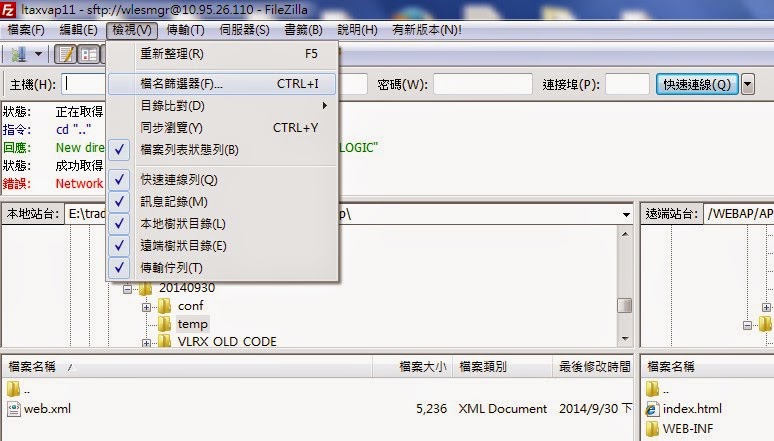
FileZilla過濾器


當要從server上下載code時,發現裡面很多資料夾都有.svn,版本控管的東西,所以當不想把這些東西也從server上抓下來時,就可以使用FileZilla的過濾器,過濾掉這些東西,只抓需要的code。

點選檔名篩選器


勾選遠端篩選器的CVS and SVN directories,再點選編輯篩選規則


接著點選左邊的CVS and SVN directories,然後再把檔案目錄都打勾,並可以透過新增更多項目及移除所選項目去設定要過濾的規則。


接著按確認,下載code時就可以避掉.svn的東西了。


Linux常用指令

ps 指令

ps aux
觀察系統所有的程序資料

ps -l
僅列出與你的操作環境 (bash) 有關的程序而已

ps -A
ps-e
所有的process均顯示出來

ps -f
顯示更完整的process輸出


finde 指令

find /var/log -iname '*.log' -type f
指定只要搜尋「檔案」名稱

find /etc -iname 'apache2' -type d
指定只要搜尋「目錄」名稱

2014年9月18日 星期四

SQL create table

postgresql:

建立table:

CREATE TABLE PUB_CARRIER
  (
    PUBLIC_CARRIER_ID NUMERIC NOT NULL,
    CREATE_DATE DATE DEFAULT 'now',
    TRANSACTION_ID   VARCHAR(18) NOT NULL ,
    CARRIER_ID1      VARCHAR(64),
    SEQ              NUMERIC(10,0) DEFAULT 0 ,
    EMAIL            VARCHAR(100),
    PRINTMARK        NUMERIC(2,0) DEFAULT 0 ,
    PRINT_DATATIME DATE,
    PUBLIC_CARRIER_STATUS VARCHAR(10) DEFAULT '00' ,
    EMAIL_INV   VARCHAR(1),
    EMAIL_NOWIN VARCHAR(1)
  )


建立primary key:

ALTER TABLE AWARD_INVOICE ADD PRIMARY KEY (SERIAL_NUMBER);


取得當月最後一天


JAVA:

public static void main(String[] args) {
SimpleDateFormat sdf = new SimpleDateFormat("dd");
Calendar calendar = Calendar.getInstance();

        System.out.println("today="+sdf.format(calendar.getTime()));
        calendar.add(Calendar.MONTH,1); //Calendar.MONTH 加上1個月(用add    Method)
        System.out.println("nextMonthDay="+sdf.format(calendar.getTime()));
        //第一天
        System.out.println("nextMonthFrist="+sdf.format(getFirstMonthDay(calendar)));
        //最後一天
        System.out.println("nextMonthLast="+sdf.format(getLastMonthDay(calendar)));

}

//每個月的第一天日期
 public static Date getFirstMonthDay(Calendar calendar) {
        calendar.set(Calendar.DATE, calendar.getActualMinimum(Calendar.DATE));
        return calendar.getTime();
 }

 //每個月的最後一天日期
 public static Date getLastMonthDay(Calendar calendar) {
        calendar.set(Calendar.DATE, calendar.getActualMaximum(Calendar.DATE));
        return calendar.getTime();
 }


Javascript:

Date.prototype.Format = function (fmt) {
    var o = {
        "M+": this.getMonth() + 1,
        "d+": this.getDate(),
        "h+": this.getHours(),
        "m+": this.getMinutes(),
        "s+": this.getSeconds(),
        "q+": Math.floor((this.getMonth() + 3) / 3),
        "S": this.getMilliseconds()
    };
    if (/(y+)/.test(fmt)) fmt = fmt.replace(RegExp.$1, (this.getFullYear() + "").substr(4 - RegExp.$1.length));
    for (var k in o)
    if (new RegExp("(" + k + ")").test(fmt)) fmt = fmt.replace(RegExp.$1, (RegExp.$1.length == 1) ? (o[k]) : (("00" + o[k]).substr(("" + o[k]).length)));
    return fmt;
}


function showWeekFirstDay()
{
var Nowdate=new Date();
var WeekFirstDay=new Date(Nowdate-(Nowdate.getDay()-1)*86400000);
alert(WeekFirstDay.Format("yyyy-MM-dd"))
}

function showWeekLastDay()
{
var Nowdate=new Date();
var WeekFirstDay=new Date(Nowdate-(Nowdate.getDay()-1)*86400000);
var WeekLastDay=new Date((WeekFirstDay/1000+6*86400)*1000);
alert(WeekLastDay.Format("yyyy-MM-dd"))
}

function showMonthFirstDay()
{
var Nowdate=new Date();
var MonthFirstDay=new Date(Nowdate.getYear(),Nowdate.getMonth(),1);
alert(MonthFirstDay.Format("yyyy-MM-dd"))
}

function showMonthLastDay()
{
var Nowdate=new Date();
var MonthNextFirstDay=new Date(Nowdate.getYear(),Nowdate.getMonth()+1,1);
var MonthLastDay=new Date(MonthNextFirstDay-86400000);
alert(MonthLastDay.Format("yyyy-MM-dd"))
}


Oracle sql:

select extract(day from last_day(sysdate)) from dual;


SELECT a.HSN_CD,
  a.ITEM_CD,
  A.Item_Nm,
  DECODE(a.ITEM_VAL,'*', to_char(extract(day from last_day(sysdate))) , A.Item_Val) ITEM_VAL,
  A.Item_Cntnt ,
  NVL(B.Hsn_Nm, '共通') Hsn_Nm
FROM TABLENAMEA a
LEFT JOIN TABLENAMEB b
On A.Hsn_Cd    = B.Hsn_Cd
Where A.Hsn_Cd = 'A';


2014年9月16日 星期二

apache Velocity 練習

練習專案的架構:


VelocityBaseTest.java:


package com.demo.test;

import java.io.FileOutputStream;
import java.io.PrintWriter;
import java.io.StringWriter;

import org.apache.velocity.Template;
import org.apache.velocity.VelocityContext;
import org.apache.velocity.app.Velocity;

public class VelocityBaseTest {

public static void main(String[] args) {
try {
   //也可使用properites設定,這邊練習不需要
//Velocity.init("properties/velocity.properties");
// 取得velocity上下文
VelocityContext context = new VelocityContext();
context.put("name", "Daniel");

Template template = Velocity.getTemplate("template/hello.vm");
StringWriter writer = new StringWriter();
template.merge(context, writer);

PrintWriter filewriter = new PrintWriter(new FileOutputStream(
"outputTemplate/hello.html"), true);
filewriter.println(writer.toString());
filewriter.close();

} catch (Exception e) {
e.printStackTrace();
}
}
}


hello.vm:

<html>
    <head></head>
    <body>
        HELLO! $name,Welcome to velocity!
    </body>
</html>


Velocity.properties:

#Velocity.properties配置示例
# 如果需要系統從WEB-INF/classes路徑載入Velocity的範本檔,取消下兩行的注釋
#resource.loader=class
#class.resource.loader.class=org.apache.Velocity.runtime.resource.loader.ClasspathResourceLoader
#如需禁止系統通過檔案系統載入範本檔,注釋如下兩行
resource.loader=file
file.resource.loader.path=D:\practice\VJ\workspace\velocitytest\template
#確定從何處載入velocity的範本檔
file.resource.loader.cache=false
input.encoding=gb2312
output.encoding=gb2312


產出的檔案:
hello.html:

<html>
    <head></head>
    <body>
        HELLO! sea,Welcome to velocity!
    </body>
</html>